The shift to cloud computing and microservices architecture has made application deployment significantly more complex. Modern applications are often composed of dozens, or even hundreds, of small, independent services, each with its own dependencies, libraries, and operating system requirements. Managing this complexity in traditional environments was fraught with issues often summarized by the phrase, “It worked on my machine!” Containers emerged as the essential solution, providing a standardized, lightweight, and highly portable way to package and deploy any application, regardless of the underlying host environment. Containers are the single most important technology enabling the rapid deployment, massive scale, and operational consistency that define the modern cloud system.
This comprehensive exploration will delve into the transformative role of containers, dissecting the fundamental technologies that enable them, the critical advantages they offer over traditional Virtual Machines (VMs), and their indispensable position within cloud-native architectures. We will examine the core components—Docker, Kubernetes, and the Container Runtime—and detail how containers have accelerated the DevOps movement, revolutionized CI/CD pipelines, and unlocked true agility for global enterprises. Understanding containers is non-negotiable for anyone involved in developing, deploying, or managing applications in today’s cloud landscape.
1. Defining the Container: OS-Level Virtualization
A container is a lightweight, executable package of software that includes everything needed to run an application: the code, a runtime, libraries, environment variables, and config files. They represent a distinct evolution of virtualization technology.
A. The Core Difference from Virtual Machines
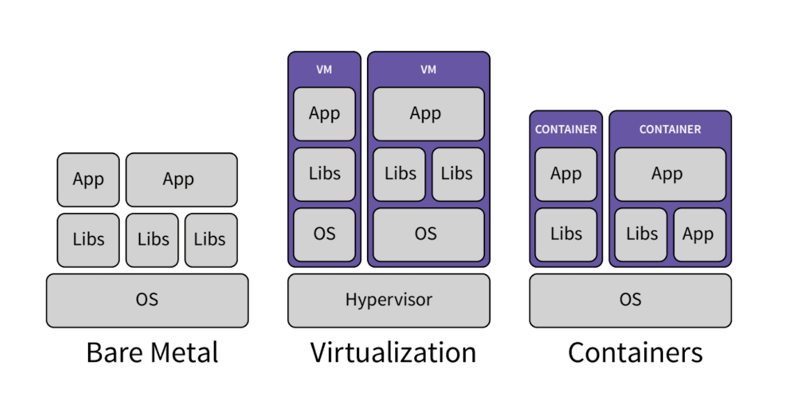
The key to understanding containers is recognizing the architectural distinction between them and traditional Virtual Machines (VMs).
-
Virtual Machines (VMs): Achieve hardware-level virtualization. Each VM includes a full copy of the operating system (Guest OS), virtual hardware, and the application. The hypervisor manages the physical hardware. VMs are large (gigabytes in size), slow to boot (minutes), and consume significant resources.
-
Containers: Achieve OS-level virtualization. All containers share the single underlying operating system kernel of the host machine. They include only the application and the necessary dependencies. The Container Runtime (e.g., Docker) manages the containers. Containers are small (megabytes), extremely fast to start (seconds or less), and highly efficient because they eliminate the overhead of the Guest OS.
B. Linux Kernel Primitives
The technology enabling containers relies on two core features built into the Linux kernel:
-
Namespaces: Provide the necessary isolation. They partition the kernel’s view of the system, ensuring that each container sees its own isolated environment (process IDs, network interfaces, file system mounts, etc.), preventing one container from interfering with another.
-
Control Groups (cgroups): Provide the necessary resource governance. Cgroups limit and allocate resources (CPU, memory, disk I/O, network bandwidth) to a set of processes, ensuring that one container cannot hog all of the host machine’s resources and starve other containers.
2. The Docker Engine: Container Standardization
The widespread adoption of containers is largely due to the Docker project, which standardized the packaging and delivery of containers.
A. The Docker Image
The Docker Image is the standardized, immutable template that defines a container.
-
Layers and Efficiency: An image is built up in read-only layers. When multiple containers are run from the same base image (e.g., a standard Linux OS layer), they share those layers on disk, saving storage space and speeding up deployment.
-
Dockerfile: Images are built using a Dockerfile, a simple text file containing instructions on how to create the image (e.g., what base image to start from, what files to copy, what dependencies to install, and what command to run). The Dockerfile ensures the build process is repeatable and auditable.
B. The Container Runtime
The Container Runtime (the Docker Engine in the early days, but now often Containerd or CRI-O) is the software that executes the instructions in the image to create a running container instance.
-
Responsibilities: It pulls the image from a repository, allocates resources based on cgroups, sets up the isolated environment based on namespaces, and executes the application process.
C. Registry and Portability
The Container Registry (like Docker Hub, Amazon ECR, or Google Container Registry) is the centralized repository for storing and sharing container images.
-
Guaranteed Portability: Because the container image contains everything the application needs, the image pulled from the registry runs exactly the same way across a developer’s laptop, a staging server, or a production cluster, solving the decades-old environment drift problem.
3. The Containers’ Role in Modern Architecture
Containers are not just a better deployment tool; they are a key enabler for modern architectural styles, particularly microservices.
A. Enabling Microservices
The microservices architecture breaks down a large application into small, independent services that communicate with each other.
-
Isolation and Independent Scaling: Containers perfectly isolate each microservice. This allows each service to be developed in the best language and framework for its specific task (e.g., Python for data science, Java for transactional processing) and to be scaled independently. If the Payment Service is under heavy load, only its containers need to scale up, leaving the slower-growing User Profile Service untouched.
-
Technology Heterogeneity: The immutable nature of the container ensures that the unique technical stack of each microservice does not conflict with others on the same host machine.
B. Accelerating Continuous Integration/Continuous Delivery (CI/CD)
Containers are the linchpin of automated software pipelines.
-
Immutable Artifacts: The container image becomes the single, immutable artifact that is promoted through all stages of the pipeline (development, testing, staging, production). Once an image passes automated tests, there is high confidence it will run correctly everywhere, removing the environment variable as a source of deployment failure.
-
Speed of Deployment: The near-instantaneous startup time of containers allows CI/CD systems to deploy, test, and tear down environments rapidly, drastically accelerating the release cycle from weeks to hours or minutes.
C. Standardizing DevOps Practices
Containers provide a shared, common language and artifact between development and operations teams.
-
Development Ownership: Developers can fully own the operational aspects defined in the Dockerfile (dependencies, runtime environment), while operations teams focus on the cluster management and orchestration. This shared responsibility improves collaboration and accelerates issue resolution.
4. Kubernetes: Container Orchestration at Scale
While Docker standardizes the container format, Kubernetes (K8s) provides the orchestration layer necessary to run containers efficiently and reliably in a large-scale cloud environment. Kubernetes is the reason containers dominate the cloud.
A. The Need for Orchestration
Running a small set of containers is simple. Orchestration is needed when managing:
-
Thousands of Containers: Coordinating resource allocation across a cluster of hundreds of servers.
-
Self-Healing: Automatically restarting failed containers, moving them to healthy nodes, and ensuring data volumes are reattached correctly.
-
Load Balancing and Service Discovery: Providing a stable network entry point for a group of identical containers that are constantly being created and destroyed.
-
Automated Updates: Managing zero-downtime rolling updates and rollbacks.
B. Core Kubernetes Objects and Containers
Containers are managed within the Kubernetes cluster via its core objects.
-
Pods: The smallest deployable unit in K8s. A Pod is a wrapper around one or more containers that share the same network namespace and storage. It is the Pod, not the individual container, that K8s schedules and manages.
-
Deployments: Use containers to define the desired state (e.g., “Always run 10 replicas of the V2 container image”). The Deployment controller ensures the cluster runs that state, handling scaling and updates.
-
DaemonSets: Ensures a copy of a specific container (e.g., a logging or monitoring agent) runs on every single node in the cluster.
C. Horizontal Pod Autoscaler (HPA)
The HPA is a critical Kubernetes controller that uses the container’s efficiency to achieve optimal scaling.
-
Function: It automatically scales the number of Pod replicas (and thus the number of running containers) up or down based on observed metrics, such as average CPU utilization or custom application metrics.
-
Cost Efficiency: By managing the container fleet dynamically, the HPA ensures the organization only pays for the compute capacity strictly needed to handle the current load, maximizing the cloud’s cost efficiency model.
5. Container Security and Isolation
Containerization provides unique security advantages and introduces new security considerations compared to VMs.
A. Reduced Attack Surface
Containers inherently reduce the attack surface compared to VMs.
-
Minimalist OS: Containers only include the necessary application binaries and dependencies, leading to a much smaller image size and fewer installed packages (and thus fewer potential vulnerabilities) than a full Guest OS in a VM.
-
Process Isolation: By running only the application process, the container limits the environment available to an attacker.
B. Enhanced Security Best Practices
Container security relies on strong, automated practices:
-
Image Scanning: All images must be scanned by automated tools for known vulnerabilities (CVEs) before they are stored in the registry or deployed. This ensures that the base layer is secure.
-
Principle of Least Privilege: Running the container process as a non-root user and utilizing robust Role-Based Access Control (RBAC) in Kubernetes ensures that if a container is compromised, the attacker has minimal permissions within the host system or the cluster.
-
Network Policies: Kubernetes Network Policies define explicit rules on which Pods can communicate with which other Pods, segmenting the network and limiting the ability of an attacker to move laterally within the cluster.
C. Runtime Security
Despite the isolation provided by Linux Namespaces and Cgroups, a breach of the host kernel remains the worst-case scenario.
-
Kernel Hardening: Security relies heavily on the host operating system kernel being securely hardened and regularly patched, as all containers share this kernel. Cloud providers ensure their host OS kernels are highly secured.
6. Containers and Serverless: The Continuum of Compute
Containers bridge the gap between Infrastructure as a Service (IaaS/VMs) and Functions as a Service (FaaS/Serverless), forming a continuum of compute abstraction.
A. Serverless Containers
The concept of Serverless Containers (e.g., AWS Fargate, Azure Container Instances) marries the flexibility of the container image with the operational simplicity of Serverless.
-
Bridging the Gap: Developers package their application into a standard Docker image (retaining full control over the runtime environment) but hand over the responsibility for managing the underlying Worker Node VMs to the cloud provider.
-
No Cluster Management: The user pays only for the resources consumed by their containers, and they never manage a Kubernetes Control Plane or cluster capacity planning, providing a high-level, cost-optimized deployment.
B. FaaS Container Support
Modern Function-as-a-Service platforms (like AWS Lambda) now allow users to deploy their functions as standard container images.
-
Expanded Flexibility: This addresses a key limitation of traditional FaaS by allowing developers to use larger container images (beyond typical FaaS size limits) and package custom runtime dependencies or proprietary binaries, increasing the applicability of the serverless model to more complex workloads.
7. Operational Benefits and Efficiencies
The adoption of containers leads to tangible operational and engineering benefits that drive business value.
A. Resource Density and Cost Efficiency
Containers are significantly smaller and more resource-efficient than VMs.
-
Maximized Utilization: Running containers allows organizations to pack far more application workloads onto each physical or virtual host machine, maximizing resource density. This increases utilization rates and drives down the per-application cost of compute resources.
-
Faster Capacity Planning: Capacity planning becomes simpler and more accurate because resources are managed in small, standardized units, making it easier to predict and manage scaling events.
B. Simplified Debugging and Testing
Containers create a reproducible environment that simplifies troubleshooting.
-
Local Fidelity: Developers can run a container locally on their laptop that is guaranteed to behave identically to the container running in production, reducing the time spent debugging environment differences.
-
Faster Iteration: The speed of container startup makes automated integration and end-to-end testing faster, allowing engineers to iterate on code changes more rapidly.
C. Dependency Management
The container image encapsulates all application dependencies, solving conflicts and simplifying updates.
-
Isolated Dependencies: Applications can use conflicting versions of libraries (e.g., Python 2.7 in one container, Python 3.11 in another) on the same host machine without any interference, eliminating dependency hell.
-
Predictable Upgrades: Updating a single dependency only requires rebuilding and redeploying that specific container image, rather than risking complex shared library updates on a large VM.
8. Containers and Future Technology
Containers are proving to be the ideal deployment vehicle for emerging technologies, from Machine Learning (ML) to Edge Computing.
A. Machine Learning and Data Science
Containers provide a crucial environment for ML workflows.
-
GPU Access: Containers can be configured to access specific hardware resources, such as Graphics Processing Units (GPUs) or specialized accelerators (TPUs), crucial for ML model training and inference.
-
Reproducible Models: The entire ML model, including the training environment, code, and necessary data connectors, can be packaged into a single container image, ensuring the model’s environment is perfectly reproducible for auditing and validation.
B. Edge Computing and IoT
Containers are perfectly suited for resource-constrained, disconnected environments like the network edge.
-
Small Footprint: Their lightweight nature makes them ideal for deployment on smaller, less powerful hardware devices (e.g., IoT gateways, factory controllers) where traditional VMs would be too large and slow.
-
Standardized Management: Kubernetes and container tools can manage distributed edge clusters, allowing centralized management and updates of applications running remotely around the globe.
Conclusion: The New Unit of Deployment
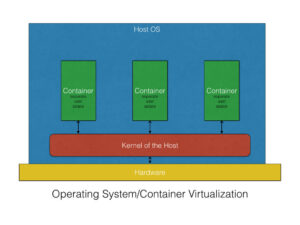
Containers have irrevocably changed cloud computing. They are the standardized, portable, and efficient unit of deployment that underlies the modern microservices, DevOps, and CI/CD movements. By providing OS-level isolationand eliminating the overhead of the traditional Guest OS, containers allow organizations to achieve unprecedented resource density and deployment speed.
While the Docker image standardizes the package, Kubernetes provides the essential orchestration necessary to manage them at cloud scale, ensuring resilience, automatic healing, and efficient scaling. The ultimate value of containers lies in the consistent environment they provide, allowing development teams to fully trust that what they build and test will perform identically in any production environment. The cloud is the platform, but the container is the application. Containers are the atomic unit of modern digital scale.