The migration to the cloud offers immense benefits in agility and scalability, but it simultaneously introduces a unique and complex set of security challenges. Unlike traditional data centers where security was perimeter-focused, cloud security is defined by the Shared Responsibility Model. This model fundamentally dictates that the cloud provider (Amazon Web Services, Microsoft Azure, Google Cloud Platform, etc.) is responsible for the security of the cloud (the physical infrastructure, global network, and hardware), while the customer is always responsible for the security in the cloud(the data, applications, operating systems, network configurations, and access management). Ignoring this shared responsibility is the leading cause of cloud security breaches. Building a robust, impenetrable cloud environment requires shifting security left, implementing automated controls, and embracing a zero-trust mindset across the entire architectural stack.
This comprehensive guide details the critical best practices and strategic imperatives required to harden your cloud environment effectively. We will dissect the most crucial domains, from identity management and network segmentation to data encryption and continuous monitoring. This is the definitive, multi-layered framework for architects, security professionals, and engineers seeking to mitigate risks, ensure compliance, and maximize the inherent security benefits of the cloud platform.
1. Mastering Identity and Access Management (IAM)
Identity is the new security perimeter in the cloud. Controlling who has access to what, and under what conditions, is the single most important control to prevent unauthorized access and data leakage.
A. Principle of Least Privilege (PoLP)
PoLP is the golden rule of IAM. It dictates that every user, application, and service should be granted only the minimum permissions necessary to perform its intended job function, and nothing more.
-
Granular Policies: Avoid using broad, permissive policies (like
*for all resources). Instead, create custom IAM Policies that explicitly list the allowed actions (Allow: s3:GetObject) and the specific resources (Resource: arn:aws:s3:::my-secure-bucket/*). -
Auditing and Review: Implement a mandatory process for periodic review of all IAM users and roles (especially highly privileged roles like ‘AdministratorAccess’) to ensure that access is de-provisioned immediately when a user changes roles or leaves the organization.
B. Multi-Factor Authentication (MFA) Enforcement
MFA must be mandated for every user account with console access, particularly administrative accounts. Compromised credentials are the easiest way for an attacker to gain entry.
-
User Accounts: Require MFA for all human users accessing the management console or interacting with the cloud environment via the Command Line Interface (CLI).
-
Virtual MFA: Encourage the use of strong virtual MFA applications or physical security keys over simpler SMS-based MFA, which is susceptible to interception.
C. Leveraging Roles over Users for Applications
Applications and cloud services should never use long-term static credentials (Access Keys) attached to an IAM User. Instead, they must utilize IAM Roles.
-
Temporary Credentials: Roles provide temporary, automatically rotating credentials when assumed by a service or application, eliminating the security risk associated with hardcoded or compromised static keys.
-
Service-to-Service Access: When one cloud service needs to access another (e.g., a VM needing to read from an object storage bucket), it should assume an IAM Role attached to the compute instance, granting it the necessary permissions only for the duration of the task.
D. Eliminate Root User Access
The primary account (often called the Root User) holds maximum control and cannot be restricted by IAM policies. This account should be secured and never used for daily operational tasks.
-
Lock Away the Root: Access keys for the Root User should be deleted, and the Root User password should be set to a complex, unique value, stored securely in a physical safe or a highly secure digital vault, and protected by strong MFA.
-
Auditing: Set up monitoring and alerting to flag any activity by the Root User, indicating a potential security incident or a policy violation.
2. Robust Network Segmentation and Security
The Virtual Private Cloud (VPC) is your private, isolated network in the cloud. Proper segmentation is essential to contain threats and control data flow.
A. Principle of Isolation (Private vs. Public Subnets)
Resources must be segmented based on their need for direct public internet access.
-
Private Subnets: All mission-critical components that do not need to initiate contact with the internet (e.g., databases, application servers, cache layers, backend services) must be placed in Private Subnets. Access to these resources should only be allowed via internal network routing or secure jump boxes.
-
Public Subnets: Only resources that must be directly exposed (e.g., Load Balancers, Web Application Firewalls, CDN endpoints) should reside in Public Subnets.
B. State-of-the-Art Security Groups and Network ACLs
These are the primary virtual firewalls used for traffic control and segmentation.
-
Security Groups (SGs): Act as instance-level firewalls. They operate at the perimeter of the network interface, controlling both inbound and outbound traffic. Configure SGs with the Principle of Least Permissiveness, explicitly allowing only the traffic necessary for the application to function (e.g., Port 443 from the Load Balancer SG, not from the entire internet).
-
Network Access Control Lists (NACLs): Operate at the subnet level, acting as a stateless firewall. Use NACLs as a secondary, coarse layer of defense to block known malicious IP ranges or specific unwanted traffic types before it even reaches the instance level.
C. Gateway Protection and Threat Prevention
All ingress and egress points should be protected and monitored for malicious activity.
-
Web Application Firewalls (WAFs): Deploy WAFs in front of public-facing applications (via Load Balancers or API Gateways) to filter application-layer attacks, such as SQL injection, cross-site scripting (XSS), and common web vulnerabilities.
-
VPC Flow Logs: Enable and analyze VPC Flow Logs to record all IP traffic going to and from network interfaces in the VPC. These logs are a crucial resource for forensic analysis, intrusion detection, and auditing network behavior.
3. Data Protection and Encryption

Data is the most valuable asset in the cloud, and its security must be maintained across its entire lifecycle—at rest, in transit, and in use.
A. Encryption at Rest (Mandatory)
All persistent data stores must be encrypted. This is the simplest yet most effective defense against unauthorized access to storage media.
-
Database Encryption: Enable encryption for all managed database services (RDS, DynamoDB, Cosmos DB) using service-managed keys or, preferably, customer-managed keys (CMKs).
-
Object Storage: Enable default encryption on all critical object storage buckets (S3, Azure Blob) to ensure every newly uploaded file is encrypted automatically.
-
Disk Encryption: Ensure all boot volumes and data volumes attached to VMs are encrypted.
B. Encryption in Transit (TLS/SSL)
All data transmitted over public networks and, ideally, between internal services, must be encrypted.
-
Mandatory TLS: Enforce the use of TLS 1.2 or higher for all public-facing services (e.g., through Load Balancers and API Gateways). Ensure unencrypted traffic (HTTP) is redirected or blocked entirely.
-
Internal Service Mesh: For complex microservices architectures, consider using a Service Mesh (like Istio) to automate mutual TLS (mTLS) between services, encrypting all internal service-to-service communication within the cluster.
C. Key Management Service (KMS) Control
Utilize the cloud provider’s Key Management Service (KMS) to manage the lifecycle and access of all encryption keys.
-
Centralized Key Control: KMS provides a highly secure, centralized, and auditable way to create, store, and control access to the CMKs used to encrypt your data.
-
Principle of Separation: Ensure that the IAM roles used by your application to use the data (read/write) are separate from the IAM roles used to manage the encryption keys in KMS.
4. Workload Security and Configuration Management
The applications and operating systems running on compute instances are the most dynamic part of the environment and require continuous attention.
A. Immutable Infrastructure
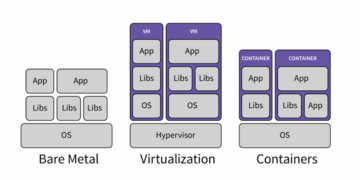
Treat your compute instances (VMs or containers) as disposable artifacts that are never patched or modified in place once deployed.
-
Build vs. Configure: If an instance needs an update (a security patch or a configuration change), you should build a new image (VM image or container image) with the changes baked in, and deploy the new image to replace the old instances entirely.
-
Operational Benefit: This prevents configuration drift, simplifies rollbacks, and ensures that all running instances are always in a known, secure state.
B. Security Patching Automation
While running immutable infrastructure helps, ensuring the underlying OS and runtime environments are patched remains critical.
-
Automated Scanning: Use managed services (like AWS Systems Manager or Azure Update Management) to automate the scanning and patching of all operating systems.
-
Container Base Images: Use minimal, security-hardened base images for containers (e.g., Alpine Linux or distroless images) and ensure that these base images are regularly updated by a trusted source.
C. Secure Configuration of Storage
Misconfigured storage buckets are a leading source of public cloud breaches.
-
Block Public Access: Enforce Block Public Access settings globally at the account level for object storage to prevent buckets from being unintentionally made public.
-
Access Logging: Enable server access logging on all sensitive object storage buckets to capture every request made, providing crucial data for security monitoring and compliance audits.
5. Continuous Monitoring and Governance
Security is not a static state; it is a continuous process of monitoring, detection, and automated response.
A. Centralized Logging and Auditing
Every action taken in the cloud must be logged, centralized, and immutable for compliance and forensic analysis.
-
CloudTrail/Azure Activity Log: Enable the cloud provider’s logging service (e.g., AWS CloudTrail) to capture every API call and action taken by every user and service in your account. The logs must be stored in a separate, secure, and immutable object storage bucket.
-
Security Information and Event Management (SIEM): Centralize all logs (VPC flow logs, application logs, audit logs) into a SIEM system to correlate events, detect anomalies, and prioritize security alerts.
B. Automated Configuration Management (Security Posture)
Use automated tools to continuously assess the environment against best practices and regulatory frameworks.
-
Cloud Security Posture Management (CSPM): Deploy CSPM tools (native cloud services or third-party tools) that continuously scan the cloud environment to identify misconfigurations (e.g., public S3 buckets, unencrypted databases, overly permissive IAM policies).
-
Automated Remediation: Configure the CSPM tools to automatically remediate common misconfigurations (e.g., automatically disabling a publicly accessible setting) or to generate high-priority tickets for security teams.
C. Incident Response Planning and Automation
A documented and tested Incident Response (IR) plan is essential to minimize the damage from a security breach.
-
Cloud-Specific Scenarios: The IR plan must include cloud-specific scenarios, such as detecting and responding to compromised IAM credentials, detecting cryptojacking (unauthorized resource use), and responding to data leakage from a public storage bucket.
-
Automated Response: Leverage serverless functions and orchestration tools to automate steps in the IR plan, such as automatically isolating an infected VM instance or revoking the compromised IAM key, to achieve rapid response times.
6. Embracing the Zero Trust Architecture
Zero Trust is the security model that assumes no user, device, or service is inherently trusted, regardless of its location or network segment.
A. Continuous Verification
Never trust implicitly based on identity or location. Every access request must be validated based on the user’s identity, device health, and the context of the request.
-
Dynamic Access Policies: Policies should be dynamic, requiring re-authentication or re-evaluation based on changes in context (e.g., user accessing from an unfamiliar location or an unmanaged device).
B. Micro-Segmentation
Extend the network segmentation down to the individual application or service layer.
-
Least Privilege Networking: Instead of relying on broad network boundaries (like the VPC), use fine-grained Network Policies (especially in Kubernetes) to define exactly which services are allowed to talk to which others, ensuring that traffic only flows on explicitly authorized paths.
C. Assume Breach Posture
Always operate under the assumption that an attacker has already gained a foothold somewhere within the network. This mindset forces robust design that focuses on limiting the attacker’s ability to move laterally and access critical data.
-
Detection First: Prioritize investment in threat detection, correlation, and rapid response capabilities over simple prevention controls.
Conclusion: Security is a Feature, Not an Afterthought

Securing your cloud environment is a continuous journey, not a one-time project. It requires a fundamental shift in mindset, embracing the Shared Responsibility Model and treating security as a core architectural feature.
The framework for achieving this relies on mastering IAM with the Principle of Least Privilege, rigidly segmenting the network with VPCs and Security Groups, and enforcing encryption for all data at rest and in transit using KMS. Furthermore, the reliance on immutable infrastructure and automated CSPM tools ensures that the security posture does not drift over time. By diligently implementing this multi-layered, automated, and Zero Trust-aligned approach, organizations can successfully harness the flexibility of the cloud while achieving a level of security and compliance that far surpasses traditional on-premises environments. Secure architecture is resilient architecture.