The rise of containers—lightweight, portable packages that bundle application code and all its dependencies—has revolutionized modern software development. However, running a few containers on a single machine is simple; running thousands of containers across hundreds of servers globally, ensuring they communicate, scale, recover from failures, and update seamlessly, is a task of immense complexity. This is where Kubernetes (often abbreviated as K8s) enters the picture. Kubernetes is an open-source system designed to automate the deployment, scaling, and management of containerized applications. It acts as the “operating system” for your distributed application fleet, abstracting away the underlying infrastructure and providing a consistent platform for deployment.
This comprehensive guide is crafted to demystify Kubernetes for beginners. We will delve into its core architecture, explain its fundamental objects (Pods, Services, Deployments), and detail the principles that allow it to manage massive scale and ensure resilience. Understanding Kubernetes is essential for anyone building or deploying modern, cloud-native applications. This guide provides the foundational knowledge necessary to navigate the world of container orchestration and harness the power of scalable, self-healing infrastructure.
1. Understanding Container Orchestration
Before diving into Kubernetes itself, it is crucial to understand the challenges it was built to solve, which fall under the umbrella of container orchestration.
-
A. Scheduling: Determining which container should run on which server (node) based on resource availability (CPU, RAM) and constraints.
-
B. High Availability: Ensuring that if a server or a container fails, the application is automatically restarted or moved to a healthy machine.
-
C. Scaling: Quickly adding or removing container instances to match fluctuating user demand.
-
D. Networking: Coordinating how containers within the cluster find and communicate with each other, often across different physical servers.
-
E. Service Discovery: Providing a stable network address for a group of identical containers, even as individual containers are created and destroyed.
-
F. Storage Management: Attaching the correct persistent storage volumes to the right containers, regardless of which server the container is running on.
Kubernetes automates all these tasks, allowing developers and operators to focus on building applications rather than managing infrastructure logistics.
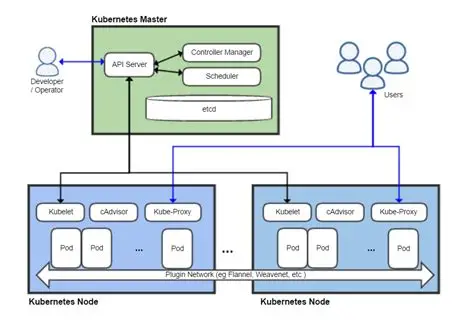
2. Kubernetes Architecture: The Control Plane and Data Plane
A Kubernetes cluster is comprised of two main sets of components that work together to maintain the desired state of the application.
The Control Plane (The Brain)
The Control Plane makes global decisions about the cluster, schedules workloads, and maintains the desired state. It is typically run on one or more Master Nodes.
-
A. API Server: The front-end for the Control Plane. All external and internal communication (including all administrative commands, client interactions, and communication between internal components) goes through the API Server. It exposes the Kubernetes API and validates incoming requests.
-
B. etcd: A distributed key-value store that acts as the single source of truth for the entire cluster’s configuration data, current state, and desired state. It is mission-critical and highly resilient.
-
C. Scheduler: Watches the API Server for newly created Pods (the smallest deployable units) that have no assigned node. It selects an optimal node for the Pod to run on based on resource requirements, constraints, and policy.
-
D. Controller Manager: Runs several controller loops that watch the actual state of the cluster (via the API Server) and attempt to move it toward the desired state (stored in etcd). Examples include:
-
Replication Controller: Ensures the specified number of Pod replicas are always running.
-
Node Controller: Notices when nodes go offline and handles the necessary cleanup.
-
The Data Plane (The Muscle)
The Data Plane consists of the Worker Nodes where the containerized applications actually run.
-
A. Kubelet: An agent that runs on every Worker Node. It communicates with the Control Plane’s API Server, ensuring that containers defined in the Pod specifications are running and healthy on its node. It monitors the state of the node and reports back.
-
B. Container Runtime: The software responsible for running containers (e.g., Docker, Containerd, CRI-O). The Kubelet instructs the container runtime to pull, start, stop, and manage the containers.
-
C. Kube-Proxy: A network proxy that runs on every Worker Node. It maintains network rules on the node, enabling network communication to and from the Pods, both internally and externally. It handles the dynamic routing required by Kubernetes Services.
3. Kubernetes Foundational Objects

Kubernetes manages applications through several core concepts, or objects, which are defined in manifest files (YAML or JSON).
A. Pods: The Smallest Deployable Unit
A Pod is the smallest and simplest unit in the Kubernetes object model. It is an abstraction layer over a container.
-
The Container Wrapper: A Pod is a wrapper around one or more containers that are logically coupled and need to share resources.
-
Shared Context: All containers within a single Pod share the same network namespace (the same IP address and port space) and storage volumes. This allows them to easily communicate via localhost.
-
Ephemeral Nature: Pods are designed to be ephemeral. They are not self-healing; if a Pod dies, it is terminated and a new one is created by a higher-level controller.
B. Deployments: Managing Application Updates and Rollbacks
A Deployment is a controller object that provides declarative updates for Pods and ReplicaSets. It is the primary way users manage stateless applications.
-
Desired State: The Deployment object defines the desired state of the application, specifying which container image to use, the resource limits, and the number of replicas (Pods).
-
Self-Healing and Scaling: It handles self-healing (ensuring the specified number of Pods are always running) and scaling (increasing or decreasing the number of replicas).
-
Rollouts and Rollbacks: Deployments manage the deployment process (the rollout) for new versions of the application, often using strategies like rolling updates to replace old Pods gradually. If a new version is buggy, a Deployment allows an instant rollback to the previous stable version.
C. Services: Network Abstraction and Discovery
A Service provides a stable network endpoint for a set of Pods, enabling reliable communication within the cluster and external access.
-
Decoupling: Services decouple the application logic from the ephemeral nature of Pods. A Pod’s IP address is temporary, but a Service provides a stable, permanent IP address and DNS name.
-
Load Balancing: When traffic hits a Service, the Kube-Proxy running on the nodes ensures that the traffic is automatically load-balanced across all the healthy Pods associated with that Service.
-
Types of Services:
-
ClusterIP: Exposes the Service on an internal IP address within the cluster (internal access only).
-
NodePort: Exposes the Service on a static port on each Node’s IP address (allows external access via any node’s IP).
-
LoadBalancer: Creates an external cloud load balancer (e.g., AWS ELB, Azure Load Balancer) and routes traffic to the Service (standard for public-facing applications in the cloud).
-
4. Key Concepts for Stateful and Storage Management
While Kubernetes is optimized for stateless applications, it provides mechanisms to manage applications that require persistent data.
A. Volumes
A Volume is a directory accessible to the containers in a Pod. Kubernetes Volumes are abstracted and provide data persistence beyond the life of a single container.
-
Pod-Scoped Life: A Volume’s existence is tied to the life of the Pod that contains it. If the Pod dies, the Volume is destroyed (unless it is a persistent volume type).
-
Shared Storage: Volumes are crucial for sharing files between the multiple containers within the same Pod.
B. PersistentVolume (PV) and PersistentVolumeClaim (PVC)
These objects address the need for data that must persist even if the Pod is terminated and replaced.
-
PersistentVolume (PV): Represents a piece of physical storage (e.g., a volume from cloud block storage like AWS EBS or a network file system) in the cluster. It is provisioned by an administrator or dynamically provisioned by the cluster itself.
-
PersistentVolumeClaim (PVC): A request for storage by a user or an application. The PVC specifies the required size and access mode (e.g., ReadWriteOnce, ReadOnlyMany). Kubernetes matches the PVC to an available PV.
-
StatefulSets: A specialized workload object used for stateful applications (like databases). It provides guarantees about the ordering and uniqueness of Pods, ensuring that a Pod always attaches to the same PersistentVolumeClaim regardless of which Node it lands on.
5. Configuration and Security Management
Kubernetes offers specific objects designed to securely manage configuration data and sensitive credentials, keeping them separate from the application code.
A. ConfigMaps
ConfigMaps store non-sensitive configuration data in key-value pairs, which applications can consume at runtime.
-
Purpose: Externalize configuration data (e.g., environmental variables, command-line arguments, configuration files) from the container image, making the application more flexible and reusable.
-
Consumption: ConfigMaps can be injected into a Pod as environment variables or mounted as files within the container’s file system.
B. Secrets
Secrets are similar to ConfigMaps but are specifically designed for sensitive information.
-
Security: Secrets store sensitive data (e.g., passwords, API keys, private tokens) and are encrypted at rest in etcd. They are mounted as encrypted Volumes or exposed as environment variables only to the specific Pods that need them.
-
Principle of Least Privilege: Using Secrets prevents developers from embedding sensitive credentials directly into the application code or container image, enforcing a better security posture.
C. Role-Based Access Control (RBAC)
RBAC is the mechanism for regulating access to the Kubernetes API and all cluster resources.
-
Roles and ClusterRoles: Define a set of permissions (e.g., “can get Pods,” “can create Deployments”). Roles are namespaced (apply to specific projects), while ClusterRoles apply across the entire cluster.
-
RoleBindings and ClusterRoleBindings: Bind a defined Role or ClusterRole to a specific user, group, or service account, granting them the defined permissions.
-
Security Imperative: RBAC is essential for multi-tenant environments to ensure that one team or application can only interact with its own resources and cannot accidentally or maliciously affect others.
6. The Deployment Lifecycle and CI/CD
Kubernetes forms the core of a Continuous Integration/Continuous Delivery (CI/CD) pipeline for cloud-native applications, automating the entire rollout process.
A. The Declarative Model
Kubernetes operates on a declarative model, contrasting sharply with the imperative models of the past.
-
Imperative: Telling the system how to do something (e.g., “Run this command on server A, then move this file”).
-
Declarative: Telling the system what the desired final state should be (e.g., “Ensure there are 5 replicas of version 2.0 of the application running”). The Control Plane figures out the necessary steps to achieve and maintain that state. This is key to automation and resilience.
B. Rolling Updates
The primary deployment strategy used by Kubernetes Deployments to update an application with zero downtime.
-
Mechanism: The Deployment gradually replaces Pods running the old version with Pods running the new version. It checks the health of the new Pods before removing the old ones, ensuring service continuity.
-
Availability Thresholds: Users define the max surge (maximum number of Pods that can be above the desired replica count during the update) and max unavailable (maximum number of Pods that can be unavailable during the update) to fine-tune the speed and safety of the rollout.
C. Blue/Green and Canary Deployments
Kubernetes facilitates more advanced deployment strategies:
-
Blue/Green: Deploying the new version (Green) alongside the old version (Blue). Once Green is tested, the Service object is instantly switched to route all traffic to the Green version.
-
Canary: Slowly routing a small percentage of user traffic (e.g., ) to the new version to monitor its performance and error rate before rolling it out to the entire fleet. Kubernetes tools and Service Mesh technologies make this granular traffic control possible.
7. Kubernetes in the Cloud Ecosystem
While Kubernetes is open-source, it is predominantly used within the context of managed cloud services, simplifying its operational burden.
A. Managed Kubernetes Services
Major cloud providers offer fully managed Kubernetes services, significantly reducing the complexity of running a cluster.
-
Provider Responsibility: The cloud provider manages the highly complex and critical Control Plane (API Server, etcd, Scheduler), handling patching, upgrading, and ensuring its high availability.
-
User Responsibility: The user remains responsible for managing the Worker Nodes (or using serverless container engines like AWS Fargate), Pod configurations, and the application deployment lifecycle.
B. Networking Integration
Kubernetes relies heavily on seamless integration with the cloud provider’s network infrastructure.
-
Load Balancer Provisioning: When a user defines a Service of type LoadBalancer, Kubernetes automatically calls the appropriate cloud provider API to provision and configure an external cloud load balancer and connect it to the cluster nodes.
-
Cloud Storage Provisioning: PersistentVolumeClaims often trigger the automatic provisioning of cloud block storage (e.g., AWS EBS volume) or file storage, linking the cloud resource directly into the cluster environment.
8. Looking Ahead: Federation and Extensibility
The Kubernetes ecosystem continues to evolve, expanding its reach and capabilities through federation and custom extensibility.
A. Custom Resource Definitions (CRDs)
CRDs are a powerful feature that allows users to extend the Kubernetes API with their own application-specific object types.
-
Extending the API: This enables users to define new types of resources that Kubernetes can manage (e.g., a “Database” object or a “DNS-Record” object) and leverage the declarative model and self-healing properties for those custom resources.
-
Operators: Operators are specialized software components that run inside the cluster and use CRDs to automate the lifecycle of complex stateful applications. They encapsulate operational knowledge (e.g., how to back up and restore a specific database).
B. Service Mesh
As the number of microservices grows, managing their communication becomes complex. A Service Mesh addresses this.
-
Function: A dedicated infrastructure layer that handles service-to-service communication, providing advanced features like fine-grained traffic routing, security (mutual TLS encryption), centralized observability, and detailed metrics without modifying application code.
-
Common Examples: Istio, Linkerd. A Service Mesh is often deployed on top of a Kubernetes cluster.
Conclusion: The Platform for Future Development

Kubernetes is the undisputed standard for modern container orchestration, providing a powerful, extensible, and resilient platform for running applications at any scale. By mastering its core components—the Control Plane (the brain) and the Data Plane (the workers)—and understanding the purpose of objects like Pods, Deployments, and Services, a beginner gains the ability to manage complex, distributed systems with declarative simplicity.
Its declarative nature ensures that the system is always working to reconcile the current state with the desired state, guaranteeing self-healing and high availability. Moving forward, proficiency in Kubernetes is critical, as it is the foundation upon which almost all future cloud-native, microservices, and modern development practices will be built. Kubernetes simplifies complexity, enabling true agility.